VK: music, video, messenger
- 3.1
- Rating
- 100.00M
- Installs
- Free
- Price

 Analysis by App-foxy
I spent time with VK: music, video, messenger as a social app rather than treating it as just another chat tool. Its appeal is easy to understand: messages, live conversations, calls, music, and video sit under one account, so I can move from a private exchange to entertainment without constantly switching apps. That convenience is also the central trade-off. VK tries to be a social network, messenger, media hub, and calling app at once, and the experience feels best when I want that broad mix rather than a narrowly focused utility.
Developed by VKL, it is free to install and aimed at a Teen audience. The app has been around since June 14, 2011, which gives it a mature feel and explains why its social side is much broader than a simple contact list. I found it most useful for keeping up with people who already use VK, following conversations in one place, and filling spare moments with music or video. If my friends and family were elsewhere, the entertainment features alone would not necessarily persuade me to move my daily communication.
How VK feels during everyday use
I find VK most useful when I decide what I’m opening it to do before I tap in: answer someone, join a live conversation, or spend time with media. That small choice helps me keep its all-in-one convenience from turning into an open-ended scroll, and it sets up a closer look at how its conversation flow shapes a typical day.
In-Depth Coverage of VK: music, video, messenger
Speed expectations when moving between social features
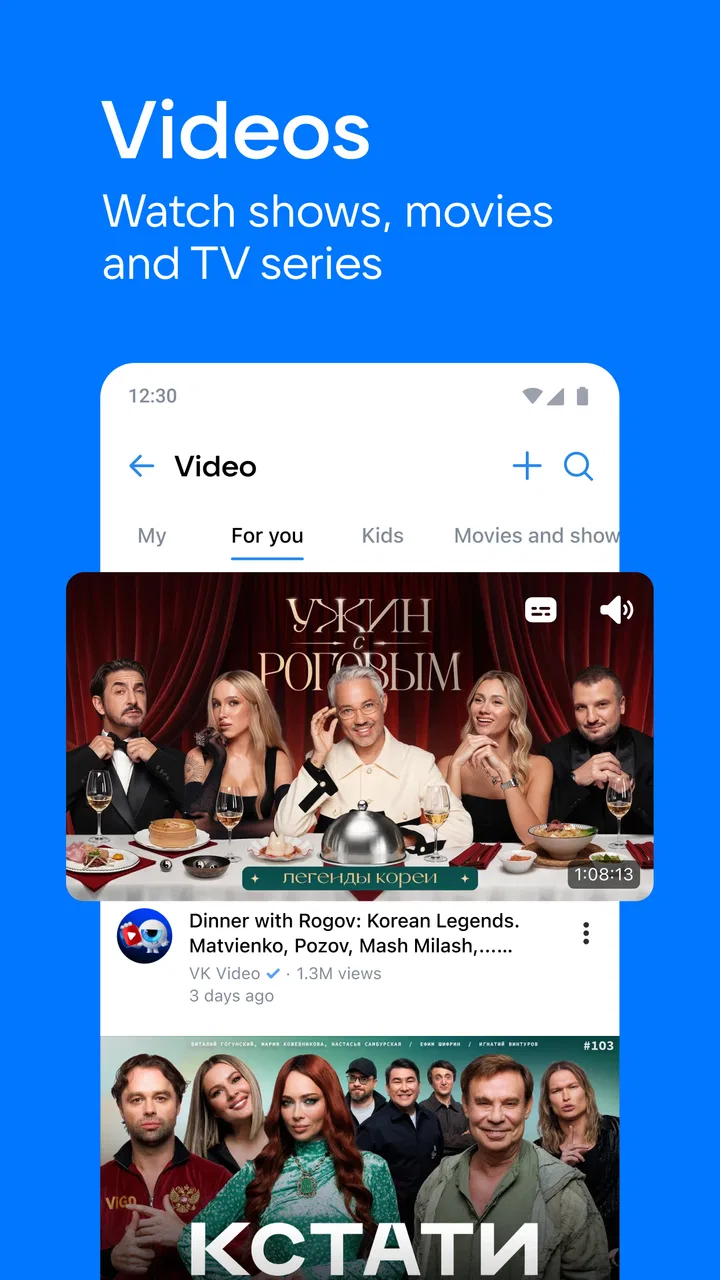
My first impression was that VK is built for frequent switching. I can check messages, return to a social feed, open a video, and then answer a call without the app feeling conceptually fragmented. That layout saves time when I am already inside the service, because I do not need a separate app for every activity. The cost is visual and functional density: there is a lot competing for attention, and finding the exact conversation or media item I want can feel less direct than using a dedicated messenger or video app.
For ordinary actions such as opening a conversation or replying to a message, I expect the experience to feel familiar to anyone who has used a large social network. The important point is not raw speed alone; it is how quickly I can understand where I am. VK generally makes sense once I learn its rhythm, but a new user may need a little patience while the social, calling, music, and video areas become familiar.
I also noticed that the app’s usefulness depends heavily on the quality of the network around me. Text communication is naturally more forgiving than calls or streaming. A short message can wait or send after a brief interruption, while live audio, video, and media playback expose weak connectivity immediately. That is not unique to VK, but the all-in-one design means I notice the difference more because I use several demanding functions in the same session.
What happens during heavier sessions
The busiest moments are not usually a single message exchange. They are the sessions where I scroll through social content, open several media items, continue a conversation, and leave the app after a call. This kind of use makes VK feel more like a full mobile environment than a lightweight chat client. On a modern device with a stable connection, that breadth is convenient. On an older or crowded device, the same breadth can make the app feel more demanding than a basic messenger.
Music and video are particularly important here. They give VK a reason to remain open after I have finished talking, but they also change the resource profile of the session. Streaming naturally uses more data than text, and long media sessions can place more pressure on battery life than a few short messages. I would not choose VK as my only tool for conserving mobile data; I would use it more carefully when I am away from Wi-Fi, especially if I plan to watch rather than simply chat.
A practical workflow helped me keep the app manageable: I handle urgent conversations first, then browse media separately instead of jumping constantly between every section. That small habit reduces distraction and makes the service feel faster because I am not asking it to become my entire phone at once. It also makes it easier to notice whether I am using VK for communication or merely opening it out of habit.
Stability, interruptions, and recovery
Reliability matters more to me in a social app than having a long feature list. A missed message or an interrupted call can be more frustrating than a missing decoration. VK’s mature age and large audience suggest a service designed for sustained everyday use, but the practical experience still depends on connection quality, device condition, and how much is happening in the current session.
When an interruption occurs, my preferred recovery path is simple: return to the relevant conversation, check whether the message or call state is clear, and continue from there. Text exchanges are easier to resume than live calls because the conversation remains readable. Media is also easier to restart than a call is to reconstruct. This difference is worth remembering if I am choosing VK for work-like communication or an important conversation; it is more forgiving for casual contact than for situations where every second of a call matters.
You May Also Like

 Lords Mobile: Kingdom Wars
Lords Mobile Is a Kingdom-Building Routine, Not a Quick Match
A case-by-case verdict on the building, battles, device demands, and social commitments that make Lords Mobile rewarding for some players and exhausting for others.

 PDF Scanner app - TapScanner
TapScanner Makes Paperwork Easier to Capture, Check, and Share
TapScanner makes scanning with a phone feel less like a rescue operation and more like a dependable step in getting work done. Its capture tools are useful, though not flawless.

 Block Blast!
 Shows How Much a Puzzle Game Can Leave Out
A quiet grid game shows why puzzle players increasingly value instant clarity, repeatable skill and low-pressure play—and where the genre still needs to catch up.

 Family Space
 Review: A Shared Routine That Makes Family Life Easier
A parenting app earns its place not by adding more noise, but by making everyday coordination easier. Family Space gets that balance mostly right.

 1Weather Forecasts & Radar
 Makes the Daily Check Worthwhile
A good forecast does more than predict rain. This week's pick turns changing conditions into a clear, practical reason to check before you step outside.

 Clash of Clans
 Makes Patience Part of the Strategy
A village builder with a sharp tactical core, Clash of Clans turns patience into momentum and each raid into a small, satisfying act of judgment.
More From Our News Desk
View All News


I would not describe the app as a minimal, distraction-free communicator. Notifications, social activity, and media can pull me away from the original task. That is a reliability issue in a broader sense: the service may remain available, yet my attention is less reliable because so many destinations are close by. I get better results when I decide in advance whether I am opening VK to answer someone, watch something, listen to music, or browse socially.
Device constraints and practical expectations
VK supports devices running iOS 9 or later, so its compatibility range reaches well beyond only the newest hardware. That does not mean every device will feel identical. Older phones may handle text comfortably while feeling less relaxed during calls, video playback, or long sessions that combine several parts of the app. Storage can also become a practical consideration when I use a service heavily for media, even though the basic app itself is free.
The free entry point is a genuine advantage. I can try the social and communication functions without paying an upfront purchase price. There are in-app purchases ranging from forty-nine cents to one hundred twenty-four dollars and ninety-nine cents per item, so I would pay attention before confirming anything inside the app. The existence of optional purchases does not make the free version unusable, but it does mean I would avoid tapping through screens casually, particularly if a younger family member uses the device.
The Teen content rating is another reason I would set expectations clearly for younger users. I would not hand the app over as an unsupervised entertainment space simply because it includes messaging and media. Families should treat it as a broad social network, not only as a music player or a private chat tool. That distinction is more useful than judging the app by one feature at a time.
Who will get the most from the combination
VK suits people whose contacts already use it and who like having several forms of communication under one roof. A student might use it to keep up with a group conversation, make a call, and then watch or listen to something without leaving the same service. Someone with friends in different places may appreciate the mixture of text messaging, live chatting, and calls. The social network side also gives the app more context than a phone-number-only messenger.
It is less convincing for someone who wants a quiet, single-purpose tool. If I only need encrypted-feeling simplicity, a focused messenger may be a better fit. If I mainly want curated music, a dedicated streaming service may offer a more concentrated experience. If video is the priority, a specialist video platform can be easier to navigate. VK’s strength is the overlap between these activities, not necessarily being the best specialist in every one of them.
That comparison also explains why the app can feel either efficient or crowded. I save effort when my social circle and media interests are already inside VK. I lose efficiency when I have to search through a busy environment to reach one simple function. Before installing it, I would ask myself whether I want a central social home or merely another way to send messages.
A realistic day-to-day example
Imagine I am commuting and need to coordinate an evening plan with two friends. I can send the first message, follow replies in the same conversation, and switch to a call if typing becomes inconvenient. During the ride home, I might use the music or video side for entertainment. When one friend answers later, I can return to the social part without opening a second communication app. That is the kind of ordinary chain of actions where VK feels genuinely useful.
The same scenario shows its limitation. If I am on a weak mobile connection, the call and media portions are more sensitive than the text exchange. If I open the app intending only to confirm the meeting time, the entertainment and social sections can easily turn a ten-second check into a longer browsing session. I like the flexibility, but I would not pretend it is always efficient. The app gives me many exits from a conversation, and I need to choose deliberately when I want to stay focused.
Useful habits for a smoother experience
My first tip is to separate communication from browsing. I answer important messages before opening music or video, because the media side is more likely to extend the session. My second is to reserve calls and streaming for a dependable connection whenever possible. Text is the safer choice when coverage is uncertain, while live features are better treated as connection-sensitive rather than guaranteed.
My third tip is to review purchase prompts carefully. Since the app is free but includes paid items, I would not assume every attractive extra is included automatically. I would also keep the Teen rating in mind when deciding whether the app is appropriate for a younger person. These are small habits, but they prevent the two most likely surprises: spending unintentionally and treating a broad social platform like a simple child-friendly media player.
A final habit is to judge the app after using it with real contacts, not in isolation. VK’s value rises sharply when the people I need are already active there. Without that network effect, I may spend time exploring music and video but still return to another messenger for actual conversations. The right test is whether it reduces the number of places I need to check each day.
Scale, maturity, and what the numbers suggest
VK has passed one hundred million installs, with an average rating of 3.3 from around 9.3 million ratings and about 11 thousand written reviews. Those figures point to a widely used app with mixed reactions rather than a universally loved one. I read that as a reason to try it against my own routine instead of assuming popularity guarantees a perfect experience.
The current version is 8.167, and the long history behind the service gives it a more established identity than a newly launched social app. At the same time, a mature platform can feel busy because it has accumulated many roles over time. I value the reach and variety, but I also understand why someone might prefer a cleaner, more focused alternative.
My performance verdict
In my experience, VK works best when I treat it as a broad social hub: messages first, calls when the connection is solid, and music or video when I have time for a longer session. Its perceived speed is strongest during short text interactions, while heavier media use naturally asks more from the phone and network. Recovery is more comfortable for messages than for live communication, so I would not make it my sole choice for urgent calls.
I recommend it to people whose friends, communities, and interests already overlap on VK. The free starting point makes trying it easy, and the combination of social networking, messaging, calls, music, and video can replace several separate habits. I would skip it if I want a minimal messenger, a tightly specialized media service, or the least distracting possible interface.
Overall, I see VK as a capable but busy companion. It rewards users who want one place for conversation and entertainment, while asking them to accept more visual noise, more demanding sessions, and paid items inside a free app. The best reason to install it is not one isolated feature, but the convenience of having your existing VK contacts and media routine together. If that matches how you communicate, it is worth trying; if not, a focused alternative will probably feel calmer and more efficient.
FAQs for VK: music, video, messenger
01What features does VK offer compared to other social media apps?
VK provides a comprehensive platform combining social networking, music streaming, video hosting, and messaging. Unlike many other apps, VK allows users to listen to music and watch videos directly within the app, making it a one-stop solution for entertainment and communication needs. Its wide range of features sets it apart from competitors.
02Is VK available for both Android and iOS devices?
Yes, VK is available for download on both Android and iOS platforms. Users can find the app on the Google Play Store for Android devices and the Apple App Store for iOS devices. This cross-platform availability ensures a broad user base, allowing seamless connectivity and interaction among users on different devices.
03How secure is my data on VK?
VK employs various security measures to protect user data, including encryption and secure servers. However, users should be mindful of their privacy settings and review permissions regularly. Like any social media platform, it’s advisable to stay updated on security practices and maintain a strong password to safeguard personal information.
04Does VK support offline music and video playback?
VK offers an offline mode for music and some videos, allowing users to download content to enjoy without an internet connection. This feature is especially useful for those who travel frequently or have limited access to data. Users should check specific content availability for offline use within the app settings.
05Are there any subscription fees or premium features in VK?
VK is free to download and use, but it does offer premium features through a subscription model. These may include ad-free music streaming, exclusive content, and enhanced customization options. While the basic functionalities are accessible to all users, subscribing can enhance the overall experience with additional perks.
Pros
- Extensive music library available.
- Seamless video streaming experience.
- Integrated messaging features.
- User-friendly interface design.
- Customizable privacy settings.
Cons
- Occasional ad interruptions.
- Limited offline music options.
- Some features require premium.
- Inconsistent video quality.
- Not fully optimized for tablets.

VK: music, video, messenger
Gallery